 Created by Drizzza
Created by Drizzza
Created by Drizzza
Roll procedural island seeds in eight island styles and shape them with simple sliders, every noise profile built around Rust's own terrain generation. Save favorites as shareable .hmseed files to reuse across projects.
Place, rotate and scale island seeds into a single landmass, anything from tight archipelagos to full continents. Sculpt by hand with nine terrain brushes, stamps and mirroring, draw or import your own island outline, or cut open channels clean across the map.
One click works out what every part of your terrain is, the way Rust does: the five biomes, Rust's topology layers, a biome-tinted ground coat, forests, lakes as real water bodies, and Rust's own cliff and rock models on the steep ground. Paint over any of it by hand where you want to overrule it.
Send out a ready-to-open Rust .map carrying your terrain, ground textures, biomes, topology, lakes, lava and cliffs together, or export .raw, .png and .xml. Pick your map size in the export panel, or batch every saved project out at once.
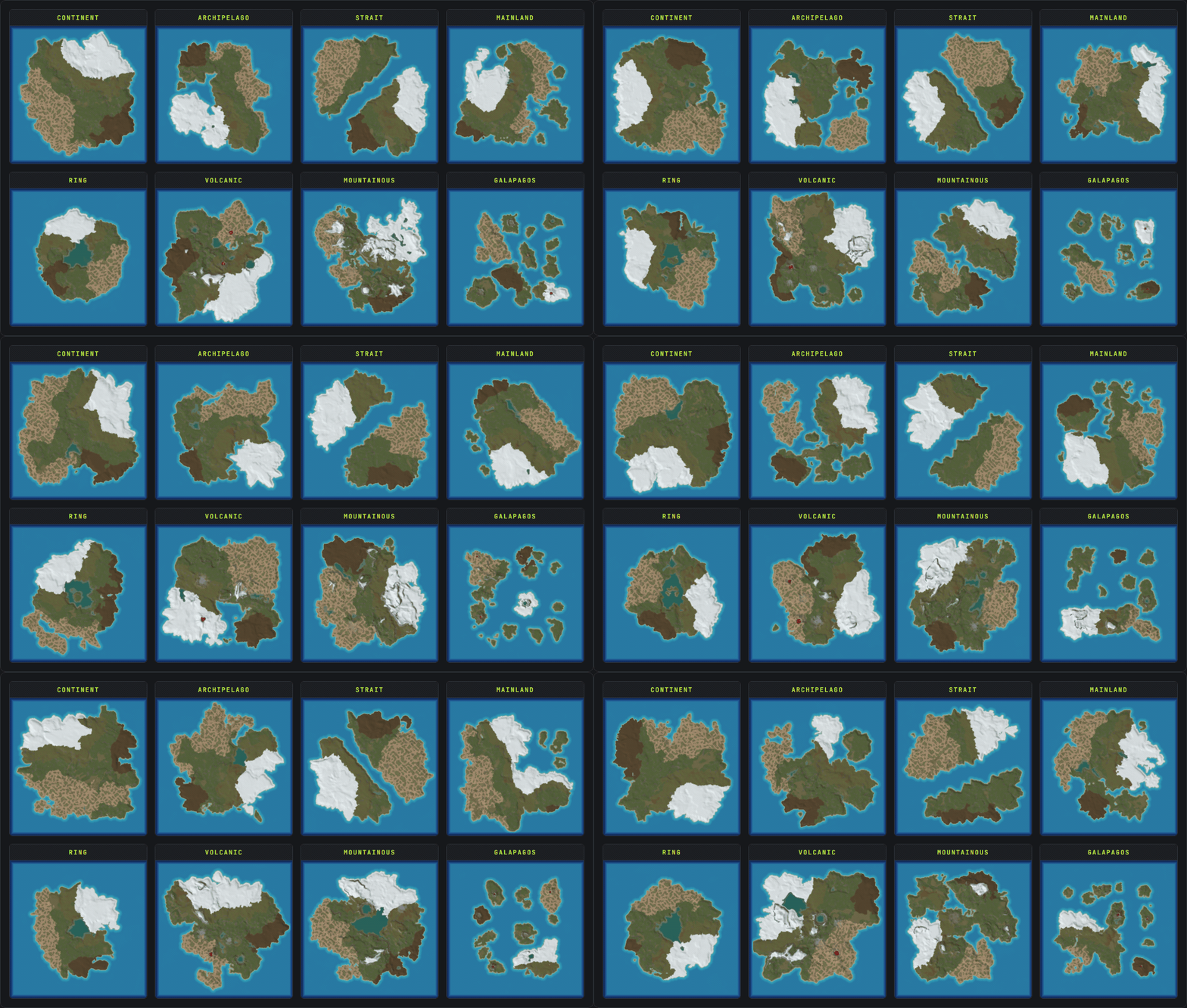
Turn on multi-island randomize and every Conjure rolls a whole map, not just one island: continents, archipelagos, straits, rings, mainlands, volcanic, mountainous and Galapagos, each with real bays, peninsulas and offshore islands. Pick which styles to roll and cap how busy the map gets.
Three of the eight island styles build a cone: a volcano with lava in the vent and ash fans down its flanks, a crater as a broad walkable bowl, and a caldera as a blown-out ring holding a lake. The lava is Rust's own prefab, so it burns anything standing in it, and it rides into the .map with everything else.
A real-time, in-game 3D view runs right inside the app, with real Rust ground textures, water and sky. Fly the camera around your island, paint the 8 Rust splat textures and sculpt terrain height live, and read the slope and grid overlays to see buildable land and in-game cells before it ever touches RustEdit.
Read the 3D viewer docsGetting cliffs out of RustEdit means running its cliff pass, and that wipes the topology already on your map, your lakes with it. So it has always been RustEdit's cliffs or your own world, never both. Crucible places Rust's actual cliff and rock models itself and writes them into the .map, so nothing has to be regenerated and nothing you made gets thrown away.
Read the cliffs docs/ Billed Annually
Download the launcher, then subscribe in its Shop
Simple to use, affordable, Rust first custom maps.

Get the free Crucible launcher, then unlock Heightmap in a few clicks and start conjuring worlds.
1,581downloads
Full written guides with screenshots, from your first island to a playable custom Rust map.
Build news, bug reports, and direct help with the tool. Drop in, say hi.
.map (or true 16-bit .raw and .png), so RustEdit opens a finished world instead of a bare heightmap..map already carries the biomes, topology, ground textures, lakes, lava and Rust's real cliff models, so it opens finished. Proc gen is there for monuments, roads, rail and prefabs..raw instead? Then run whatever you like, since a .raw carries height and nothing else..map (or .raw), then open it in RustEdit and add your monuments, roads and prefabs on top. Check the tutorials and demos above for video walkthroughs and guides with more detailed info..map (or a plain .raw heightmap). You open that in RustEdit and use its tools (or proc gen) to drop monuments, roads and prefabs on top..raw (or baked into the .map export)..map file somewhere (I like to create a new folder in my server root called maps), then point the levelurl in your server .bat file to the map file path. The code below shows how to properly update your server .bat for this:
@echo off
:loop

cd /d "C:\Path\To\Your\Server\Folder"

echo Starting server...
RustDedicated.exe -batchmode ^
+server.port 28015 ^
+server.levelurl "file:///C:\Path\To\Your\Maps\yourmap_v1.map" ^
+server.maxplayers 1 ^
+server.hostname "Your Server Name" ^
+server.identity "yourserver" ^
+rcon.port 28016 ^
+rcon.password YOUR_RCON_PASSWORD ^
+rcon.web 1

echo Server stopped. Restarting in 10 seconds...
timeout /t 10

goto loopRustDedicated.exe lives in..map file (keep the file:/// prefix).client.connect localhost:28015 to join and walk your map.
yourmap_v2.map) and point server.levelurl at it, or delete the old .map from both places it lives: your server identity folder (...\server\yourserver\) and your Rust client's map cache (C:\Program Files (x86)\Steam\steamapps\common\Rust\maps).